
VECTOR 28CN Setup Guide
Wi-Fi Setup
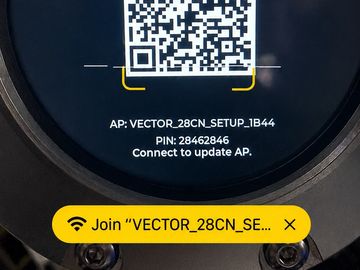
Step 1: Scan the setup QR code "VECTOR_28CN_Se..." network
On the VECTOR 28CN display, scan the QR code with your phone. When your phone asks to join the VECTOR setup Wi-Fi network, tap Join.

Click Join
This will allow you to Select and Join your Local Wi-Fi network
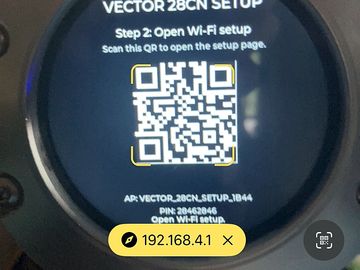
Step 2: Open the setup page
After joining the VECTOR setup network, open the setup page shown on the display. It will usually look like:
192.168.4.1

Scan Wi-Fi Networks
The will look for local networks
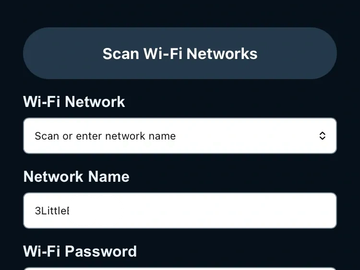
Select your network and add the Password
This opens the Setting website
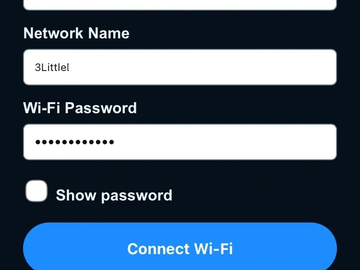
Click Connect to Wi-Fi
This connects and saves the Wi-Fi information
ADSB setup

With Wi-Fi setup, the ADSB setup screen should appear

Location can be set with a Major Airport or GPS Lat/Long coordinates
GPS Lat/Long coordinates can be found using Google Maps
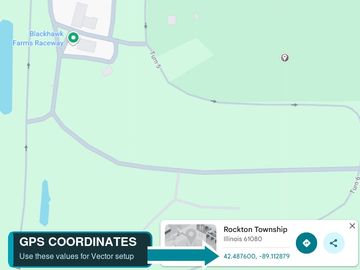
Using Google Maps
GPS Lat/Long coordinates can be found by click a point on the map and the GPS Lat/Long are in the details

Select ADSB feed
There are 4 built in options for ADSB data
ADSB.fi
ADSB.lol
ADSB.live are all currently free and do not require login credentials
OpenSky Network requires login and can be found at https://opensky-network.org/
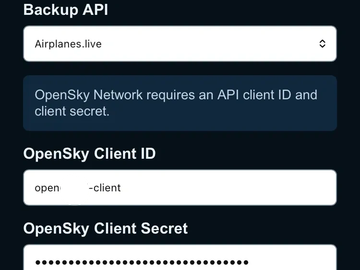
For OpenSky-Network
OpenSky Network requires login and can be for at https://opensky-network.org/
There is a section for Client ID and Client Secret
Click Save Setting to finish setup
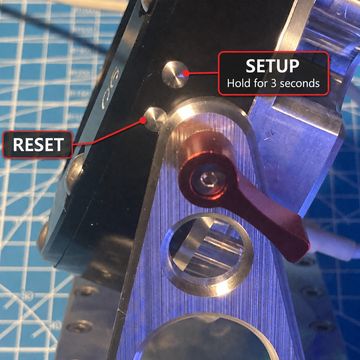
Side Buttons
Top button
Hold for 3 seconds to Enter Setup mode
Wi-Fi, GPS, ADSB sources and Update can all be found here
Lower Button
Reset/Reboot device